Showing posts with label application. Show all posts

Wednesday, 16 November 2016

WhatsApp Introduces Video Calling

Some good news in this time of chaos all around! The most popular messaging app WhatsApp officially introduced video calling for its over 1 billion users worldwide on iOS, Android and Windows platform.


“We are introducing this feature because we know that sometimes voice and text just aren't enough. And we want to make these features available to everyone, not just those who can afford the most expensive new phones or live in countries with the best cellular networks,” WhatsApp said in a blog post.

To try out this feature, users can press the call button on the top right corner in a chat which will bring up two options: voice call or video call. To place a video call, click on the option from the screen. Users can also simply switch between the rear and front camera, mute conversations and disconnect the call as well.

While Facebook Messenger users have enjoyed voice calls for over a year and a half, many popular messaging apps like still don't offer the feature. With over one billion users, WhatsApp's video calls can connect people all over the world.

Sunday, 6 November 2016

Much Awaited Nokia Android Smartphones to be available only in 2017

Ever since the first of Nokia Android smartphones were spotted on the benchmarking websites, Nokia fanboys and prospective smartphone buyers have been eagerly awaiting the erstwhile feature phone king to launch its first Android smartphone.


After it was confirmed that the first of Nokia Android device, Nokia D1C was, in fact, a 13.8-inch tablet running on Android 7.0 Nougat , Nokia fans were awaiting the release of the tablet and other Nokia Android smartphones during the busy holiday season of 2016. However, new reports indicate that Nokia’s four Android devices (1 Android Tablet and 3 Android smartphones) will be available only in the first half of 2017.

The news was confirmed after a company called HMD Global purchased the rights to manufacture, sell and advertise all Nokia smartphones. According to a new report on
Adweek, HMD Global will kick off a huge marketing campaign for the four Nokia smartphones only in early 2017. This means that the Finnish smartphone manufacturer plans to launch its first Android smartphone only next year.

In fact, HMD Global has chosen the famous ad agency, Mother as its lead global agency to make advertisements for Nokia Android smartphones. Both companies have already confirmed the deal and offered comments on the matter.

“ Nokia is a truly iconic, globally recognized and trusted brand. As the exclusive licensee of the Nokia brand for mobile phones and tablets, our ambition was to find a like-minded agency who grasped both the opportunity and responsibility in bringing a new product range to market. We are confident that in Mother we have found a partner who can help us do so for a new generation of consumers around the world ,” said HMD Global CMO Pekka Rantala stated.

Rumors suggest that the Nokia Android smartphones will feature QHD displays, metal shells 22.6MP camera and top of the class batteries like the old Nokia feature phones. Also, Nokia smartphones are speculated to feature high-end Snapdragon 820 processors together with water and dust resistance features.

From the above news, it is confirmed that the first of Nokia Android smartphones will only be available to buyers in the first half of 2017. Those buyers who had been putting off buying new Android smartphones till the holiday season in expectation of buying Nokia’s first Android offerings will have to put off their buying plans till 2017.

Their patience would be well worth it provided Nokia comes out with quality Android smartphones like the rugged and long lasting Nokia 1100 and 3100 phones it is remembered for.

Monday, 31 October 2016

Google Allo – Most Electrifying App

Google Allo, a next generation and Artificial Intelligent Social Messaging App, is here and is now available for download from the Play Store. Google has finally made it!! App is now available and we have found it very interesting and electrifying app but with some privacy issues.


What we Like in Allo

Today we have got full package of Allo, by initial impressions we have got to know upto what extent this app can be used to automate messaging and flow of information. There’s a lot of data that app inhales and shows up you the fascinating stickers, mesmerizing answers to your queries. Even If you’re bored you can play games, watch funny videos, can have jokes, quotes and some out of bound information. There’s lot more that you can do with this inbuilt Google Assistant clone in Allo.
You can even increase the font size of conversation to show the depth of your words. Also, There’s a third person or group integration with Google Assistant.

You can checkout mails from your Gmail within the app. Also you can plan, watch, eat and find direction by using the app. There’s lots of things it can do for you that even we have not imagined.
What We Don’t like

Despite having these tremendous overwhelming features, there are some issues also. As said for Artificial Intelligence, there’s a dire need to Data to make Artificial brain more intelligent. So the same is the matter with Google Allo. It needs more and more input from user to better understand us. So, Whatever your are typing in non-incognito mode is getting recorded and further it is used by Google Assistant to make connections in neurological way.

Google told us back at Google IO that the messaging app is going as a step forward for privacy. Alongside the end-to-end-encrypted Incognito Mode, the Allo team talked about bold new message retention practices, storing messages only transiently rather than indefinitely.

But now, they are storing it indefinitely for non-incognito chats. Google has came back from its sayings. The records will now persist until the user actively deletes them, giving Google default access to a full history of conversations in the app.

As per Google they have changed it to make Allo’s smart reply feature much more useful.

Saturday, 29 October 2016

Vine is going Discontinue its App Soon

Many a times Vine became popular but due to limitations and less sharing tools it descended time to time. Today, Vine has announced that they will be shutting down its app “in the coming months”.

This 6 seconds loop video service was launched in 2013 by Twitter. It offer users to share videos with different frames and filters. Due to limitations and inventions of other social platforms like Instagram and Snapchat, Vine lost its Sheen.


Now, due to low count of active users, management has decided to shut down the app permanently in the coming months.

Currently, team didn’t revealed any particular date or time when the App will went off. But do stay connected with us we will let you know about it.

Monday, 11 July 2016

Now a smartphone app to manage your privacy preferences

The privacy assistant app can learn the user's preferences and quickly recommend the most appropriate settings, such as with which app to share the user's location, or contact list.


In the field test, people accepted almost 80 per cent of the recommendations made by the privacy assistant and indicated they were more comfortable with their privacy settings than without it.

Researchers are developing a personalised privacy assistant app that can simplify the task of setting permissions for your smartphone applications.

That is a job that requires well over a hundred decisions, an unmanageable number for the typical user, researchers from Carnegie Mellon University (CMU) in the US said. The privacy assistant can learn the user’s preferences and quickly recommend the most appropriate settings, such as with which app to share the user’s location, or contact list.

Friday, 8 July 2016

Google Now on Tap update adds app translation, barcode/QR scanner, and more

Building on a new text selection and search feature introduced last month, an update to Now on Tap adds the ability to translate foreign languages found in any app. On Tap can now also read QR and bar codes, as well as suggest interesting articles and videos as part of a new Discover feature.


The new translate feature works from any app or webpage. Activating Now on Tap on a screen that contains a sizable amount of foreign language will bring up a “Translate this screen” card followed by what language is being translated. The Google app will then pop up the translated page in a new window.

Unfortunately (but understandably), only the contents of that immediate screenshot are translated and not the rest of the page. The translate feature is currently available for phones with the language set to English, French, Italian, German, Spanish, Portuguese, and Russian, but it can translate several more languages, including Japanese.

Last month’s update added the ability to officially use Now on Tap in the camera app to search for famous landmarks. On Tap can now recognize bar codes on packaged products and QR codes. Finally, this update adds a “Discover more…’ card for certain topics. Tapping it will bring a stream of articles and videos so that you can learn more of a topic.

As with other Now on Tap updates, the new features are enabled server-side and already showing up for many users.

Tuesday, 5 July 2016

MX Player - Best Video Player

MX Player is a video player for Android, which is available free. It supports almost all the formats of video available. High-quality screen, video playback, advanced controls for video playback, and its availability for almost all the Android devices makes the MX player best.  MX video player certainly has an edge over all the others video player available due to its qualities and features. Let us have a look at some of the key features of this video player.


Key Features of MX video player:

Acceleration of hardware – With this new video player, video acceleration with the hardware can be done easily. This player uses a HW+ decoder for providing hardware acceleration.
Decoding – The MX Player Android is the first video player to support decoding of multi-core level.
Easy Zoom, Pan- Zoom and normal Zooming in and out is just easy by the use of this player. You can easily swipe to get your zooming function done. You can also see the Pan and Zoom option also.
Gestures for subtitles – Just scroll forward to go to the next text or scroll backward for the previous text. Similarly, scroll up for moving text up and scroll down to go the text down. You can zoom to change the size of the text.
Special Lock for Kids – MX Player Android gives you the option of entertaining your kids without worrying about the fact that they don’t touch other applications or make a call.
The above were the key features of MX Player App. Now let us show you all the features of this MX player App in a descriptive way so that it will make things clear about why to choose this video player.


Features:

1. Playback:

Almost all movie files are playable. Files include .3gp, .flv, .avi, .mkv, .mpeg, .mp4, .mov, .xvid, .webm and other formats.
With HW+ decoder, hardware decoding can be done
It provides Codecs like Tegra 2.
You can change the audio track.
Change the decoding mode by choosing SW or HW.
Moving forward and backward is provided as Optional
You can select the aspect ratio.
Watch the previews before selecting.
Keyboard shortcuts:
Space can be used for Resume and Pause
Left / Right button on DPAD: Move backward / forward
Menu shortcuts
Select anywhere between elapsed time and the remaining time of video
Play your video in the background – Press the play button for a long time.

2. List

User Interface
Folder List –Separates movie files from other files.
Tags – Separates the subtitle file if the movies are having one.
The movies that have been watched and the movies which were last played is shown in different color.
You can resume your movie where you left.
File Management
It can scan the whole SD card within few second.
Editing of Files and folders.
Search your favorite movie.
Enjoy MX video player with different themes.

3. Subtitle

Supported Subtitle Formats
DVB, DVD, ASS/ SSA Subtitle Tracks.
PowerDivX(.txt/.psb)
SubStation Alpha along with the full styling.
Teletext
TMPlayer (. txt)
WebVTT (. vtt)
PJS ( .pjs)
You can also find the subtitle online.
Choose the subtitle you want.
You can clear the text.
You can choose the style you want for your text.
TTF and OTF format fonts are supported.
You can adjust the syncing process.
You can also adjust the speed.
With this player, you can make your text disappear easily.

4. Screen

Gestures
Swipe to zoom or pan.
Drag Horizontally to Change position of playback.
Vertically dragging on right half will let you control the sound volume.
Brightness can be controlled by vertical dragging on the left half of the screen.
Double tap will make the video to Play or Pause.
 Locking system for kids
Prevents kids from unlocking.
You need to touch the 4 corners in a clockwise direction to unlock the screen.

5. Audio

You can increase the volume up to 200%

6. Supported Platforms

OS: Android version 2.1, Windows 8.1, Windows Phone with OS 8.1 and above.
The above mentioned were the features of the MX video player. These are the reasons, which make the MX Player download a must for everyone. The MX Player download option is available for free on Android devices and Apple devices by visiting their app stores.

Thursday, 7 April 2016

WhatsApp Adds End-to-End Encryption Security for Its 1 Billion Users

whatsapp_encryption_1

With more than 1 billion users, WhatsApp is the second biggest communication environment in the world after its owner Facebook. So when the messaging, talk, and video service makes a change, it affects a whole lot of people. And on Tuesday, WhatsApp announced that it will now provide end-to-end encryption for every communication on the platform.

The service has been working on expanding this security feature since it announced end-to-end encryption for chat messages in November 2014. Now, beyond just messages, every type of WhatsApp communication will be encrypted locally by the sender, travel in encrypted form, and be decrypted only by the receiver. It all happens automatically to make it easy on users, and WhatsApp itself won't have the keys to decrypt any of the data moving across its network.
Law enforcement agencies have long brought warrants to tech companies asking for user data. Companies have generally complied, but there is sometimes tension as Apple's recent fight with the FBI shows. Though it is not a protection in every scenario, end-to-end encryption is seen as a way for companies to avoid many instances in which they might be asked to act as an intermediary. If a company can't itself decrypt user communications, it can't do it for law enforcement.

WhatsApp founders Jan Koum and Brian Acton wrote on Tuesday:
Recently there has been a lot of discussion about encrypted services and the work of law enforcement. While we recognize the important work of law enforcement in keeping people safe, efforts to weaken encryption risk exposing people's information to abuse from cybercriminals, hackers, and rogue states.
While WhatsApp is among the few communication platforms to build full end-to-end encryption that is on by default for everything you do, we expect that it will ultimately represent the future of personal communication.

whatsapp_encryption_1_new

The company and its parent Facebook have already been tested on these issues. In March, Facebook's vice president for Latin America, Diego Dzodan, was arrested in São Paulo, Brazil, for "repeated non-compliance with court orders" to provide communications from WhatsApp. A Brazilian judge ordered Dzodan's release a day later, noting that "the extreme measure of imprisonment was hurried," according to the Agence France-Presse. WhatsApp said in a statement at the time that, "We are disappointed that law enforcement took this extreme step. WhatsApp cannot provide information we do not have."

The company still uses some careful language to hedge what it's doing, though. As Micah Lee, a founder of the Freedom of the Press Foundation, pointed out on Twitter, WhatsApp's legal information page still says that it reserves the right to collect message metadata. "WhatsApp may retain date and time stamp information associated with successfully delivered messages and the mobile phone numbers involved in the messages, as well as any other information which WhatsApp is legally compelled to collect." Similarly, in its mobile app's security section, WhatsApp says that it uses end-to-end encryption for communications "when possible."

There may be things WhatsApp can do to heighten its user security even more, but implementing end-to-end encryption at all is an ambitious project. It has clearly been a priority for WhatsApp given the timeframe in which the company delivered it. Now, WhatsApp's 1 billion international users may become guinea pigs as the debate over strong encryption continues.

Saturday, 23 January 2016

New Mobile Phone Features That Can Help Grow Your Business

The need for small business to increase their profitability and productivity through mobile technologies such as the Apple iPhone and iPad, devices running Google Android and Windows 7 Mobile or using Blackberry is constantly surging as these technologies grow and expand. Small business owners wonder how to keep up with this ongoing growth of business technology and mobility. As a business grows to keep up with the times, so does the need for more complex information from presentations to accessing documents and various applications to execute various mobile tasks.

The latest features mobile technology can integrate an even wider variety of applications and software, thus facilitating collaboration and communication in a variety of settings more than ever before. Mobile technologies are also offering new approaches to working as well as new products and services to customers.

Here are three significant areas where mobile technologies are changing the way small businesses and companies are doing business:

Networking / Communication

Mobile technology allows companies to have an unprecedented level of connectivity between employees, vendors, and/or customers.

The latest mobile phone features not only operate faster, but also facilitate networking and communication between employees, vendors, and/or customers. For example, small business owners can download a special app designed for note-taking and other special features to help prepare for networking and communication easier. With the right app, your smartphone or tablet can become a note-taking machine. These notes can serve in a meeting with a potential client.

E-Commerce

The e-commerce world is significantly changing the way the world is doing business from e-commerce apps that offer a more enhanced shopping experience whether you're booking a ticket for a special event or purchasing a pair of boots from an online retailer. The more apps you download, the more storage space your mobile phone will need. As pointed out in this article, the world of technology is moving towards an increased focus on data storage.

Presentations

Today's mobile devices have larger screens with crisp photo resolutions and brighter colors which appeal when giving a spontaneous sales presentations to potential clients. Forget powerpoints or slides filled with texts. A mobile device can easily be toted along, but better yet, its compact format lends itself to keeping the information short and impactful whether you're in a meeting or networking. Because the visual features of mobile technologies are clearer and crisper than ever before, consider taking advantage of these features to present meaningful information that can serve your business goals.

The latest in the features of mobile technologies increase productivity and profitability. Along with their applications and software, it has become easier than ever for small business and companies to collaborate and communicate with customers from all over the world.

Friday, 4 December 2015

How to make your smartphone faster

                 How to make your smartphone faster


Here are the top 5 tips to make your phone run faster:

1) Use only essential widgets on your homescreen – each widget consumes memory and processing power which can slow your down your phone.

2) Uninstall apps that you don’t use – after awhile your phone can get cluttered as some Apps are designed to always run in the background. If you rarely use an App, then uninstall it to free up memory and CPU resource.

3) Install Apps to your phone memory – if you have an SDCard, always install Apps to the phone memory, which can be accessed faster. If you have Apps on the SDCard, then move them back to the phone memory with an App called Move2SD available from the Play Market.

4) Use Static rather than Live wallpapers – Live wallpapers consume processing power and memory. Unless you really must have them, uninstall them.

5) Kill tasks occasionally – Some Apps will run in the background indefinitely unless you kill them. Most of them won’t cause a problem, but it pays to check your running tasks from time to time. Hold down your Home key and check the Task Manager.

6) Don’t use Task Killers. Android manages tasks very well and Task Killers just make your phone unstable and can slow it down further.

Tuesday, 20 October 2015

Edijing- Best song mixer music appliction.

       Edijing- Best song mixer music appliction.


This app is very helpful in cutting and mixer of two or more songs with various attractive effects.
It is also widely used application for music lover.
Various features are included in this:

watch this video for details:


Thursday, 23 July 2015

New Whatsapp Update

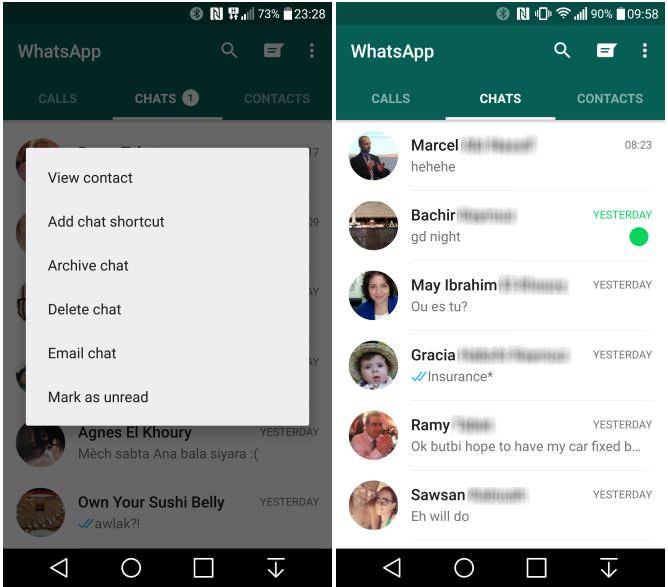
New whatsapp update brings custom notifications, mark as unread, and low data setting for voice calls


"WhatsApp is expected to roll out a new version of its app on Google Play and the App Store with a handful of new features"
WhatsApp is all set to roll out a new updated version of its app for Android and iOS. The beta version of the app with build number 2.12.194 is available on the company's website, and is expected to roll out on Google Play and the App Store soon.

The new version will bring a handful of new features like custom notifications, Mark as Unread, and a low data consumption setting for voice calls. Custom notifications lets users select particular types of notifications for specific contacts. Users can now choose to mute any chat for a specific time period, select ringtones, notification LED light behaviour, popup notifications, and the vibration length for messages.

Mi Notebook 14, Mi Notebook 14 Horizon Edition With 10th-Gen Intel Core Processors Launched in India

Mi Notebook 14 and Mi Notebook 14 Horizon Edition on Thursday made their debut in India as Xiaomi's first laptops in the country. The M...